Keytakeaways
- Internal links improve site structure and help users and search engines navigate your content.
- External links build credibility by connecting your content to trusted sources.
- Both link types support SEO differently, but work best when used together.
- Smart linking boosts engagement, rankings, and overall user experience.
Links in digital marketing are essentially roads that connect the internet. They help visitors and search engines navigate your pages. This is critical to how well your site ranks on Google and other search engines.
But links are not all the same. This guide covers two main types of links that are internal and external links. You will learn what they do and why both are important for SEO. And how to use them effectively on your website.
What are Internal Links?
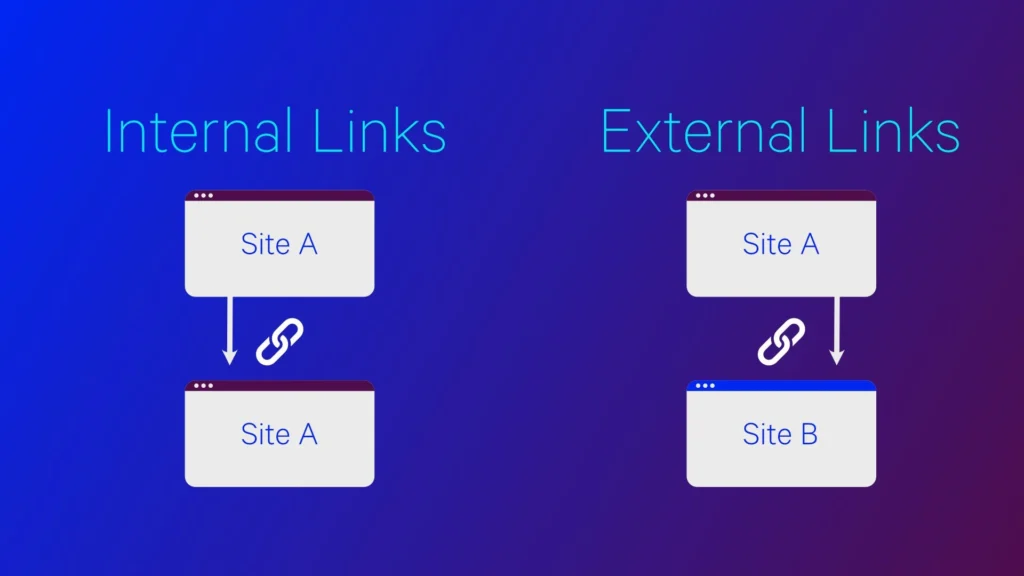
Such links connect one page on your website to another page on the same website. They keep the user inside your domain. Some common examples include:
- Links in your main navigation menu.
- Links in the footer or sidebar.
- Links you place inside a blog post that lead to another post you wrote.
- “Read more” links pointing to related articles.
Such links are vital as they help visitors navigate your content and enable search engines to discover all other pages on your website.
What are External Links?
Such links are also known as outbound links and direct visitors away from your website to another website or domain. Examples of external links include:
- Links to reference articles or research reports you used.
- Links to tools or guides published on other well-known sites.
- Links to a partner’s website.
A link from your article to a source like Wikipedia is an external link. Such links make your content seem more trustworthy and help connect your site to other websites which is good for SEO.
Difference between Internal and External Links
Here is how these two types of links compare:
| Feature | Internal Links | External Links |
| Where do they go? | To pages on the same website. | To pages on other websites. |
| Your control | You have complete control over these links. | You do not have complete control over the other site. |
| SEO effect | Spread page authority across your site. | Demonstrates credibility and provides context which indirectly helps SEO. |
| Main Goal | Help users navigate and see the structure. | Act as references and build credibility. |
| User Experience | Keeps users focused on your site. | Gives extra information from other sources. |
| Example | Linking your homepage to your “About Us” page. | Linking to a news article on a different site. |
Internal links keep visitors on your website. While external links send them elsewhere. It’s the core difference between the two of them.
Why do links matter for SEO?
Links are necessary for technical SEO because search engines use them to determine some key information. This includes:
- What your content is actually talking about.
- How are the different pages on your website related?
- Which outside sources do your information come from?
Google and other search engines follow links to explore the web. Internal links help users find all pages on your website. External links from reputable sites indicate that your content is reliable and engaging.
What are the benefits of Internal Links?
Such links are great for both on-page SEO and how people use your website for these reasons:
- They allow visitors to easily find what they need and stay engaged with your website.
- They help search engines discover and index all your pages. Otherwise some might get lost and won’t appear in search results.
- They help share authority from your strongest pages like your homepage to weaker pages. It allows them to rank better.
- You encourage people to stay on your site longer by linking to related content. This helps reduce your website’s bounce rate.
- A great linking system informs search engines which pages are important and how your content is structured.
Consider developing a smart plan first to boost your SEO and user experience through internal links.
What are the benefits of External Links?
Sending users to other sites actually has several benefits for your off-page SEO:
- Your content appears more credible mainly when you include facts or data and link to trusted sources.
- Linking to renowned websites tells search engines that your content is reliable which helps improve your ranking.
- External links provide readers with additional background or examples which makes your article more helpful.
- Linking to other sites can get you noticed. And if they link back to you then it provides a strong boost to your SEO.
External links in short are vital because they validate your content and connect your website to a broader internet ecosystem.
How to use Internal and External Links
Using links properly means planning where and how to place them and not just adding them everywhere.
Tips for Internal Links
- Use clear words that clearly describe the page you are linking to like “our latest SEO guide” instead of using vague terms like “click here”.
- Only link to pages that are relevant and provide real value to users.
- Avoid using too many links as this can reduce the SEO benefit you get from each link and clutter your readers.
- Ensure to link from your important pages like your homepage to other main content. This will help you maintain a clear website structure.
- Regularly check for and fix any broken or outdated internal links.
Tips for External Links
- Only link to websites that are authoritative and relevant to your topic.
- Use rel=”nofollow” tag to tell search engines not to pass your SEO authority to that website. It will help you when you have paid ads or links you don’t fully support.
- Set external links to open in a new tab so that visitors remain on your website.
- Limit unnecessary links as too many of them can distract users and harm your rankings.
Following our tips will help you ensure that your efforts improve users’ experience and deliver best results.
What are the Common Mistakes to Avoid?
Even experts can make errors that harm their efforts. Avoid them for best results.
- Regularly check for and fix broken links to avoid frustrating users.
- Having too many links on a single page reduces each link’s value and makes your content look spammy. Ensure you maintain a good balance.
- Linking to low quality or completely unrelated websites hurts both your credibility and your SEO.
- If you forget to link new content from other pages on your site then search engines may struggle to find and properly rank it.
Avoid these simple mistakes to ensure your links always help and not hurt your SEO performance. Doing this will also guarantee your success in the long run.
Conclusion
Both internal and external links are vital and work hand in hand. Inbound links refine your website and retain visitors’ attention. Outbound links build trust and make your content appear more precious.
A great linking plan uses both internal and external links to improve SEO and demonstrate to search engines that your content is reliable. If you learn to use them correctly then you can build a strong website that ranks higher and serves you better.
FAQs
Q1. What is an internal link?
It links one page to another page on your website. This helps visitors and search engines move around your site easily.
Q2. What is an external link?
Such a link sends visitors from your website to a completely different website. This enhances user experience while sending target traffic to partner sites.
Q3. Do internal and external links affect SEO?
Yes as inbound links help organize your website and make it easier for search engines to find pages. While outbound links make your content more reliable and provide extra info.
Q4. Should external links open in a new tab?
Yes, opening them in new tabs will allow you to keep visitors on your site for longer. This further boosts audience engagement and improves your users’ overall experience.
Q5. How many internal links should a page have?
There’s no set number. Consider adding relevant links only to make navigation easier and improve user experience. Quality will always beat quantity for better SEO results.
Q6. Do external links help build relationships?
Yes, linking to reputable websites can build relationships that may lead them to link back to you. This creates valuable backlinks that boost your site’s authority and rankings.
Also Read:
Top 20+ SEO Interview Questions and Answers
International SEO Best Practice
How to Find Serp Features Opportunities